---
title: How to View eStore Analytics for Order Fulfillment | RUSH
description: Learn how to view eStore Merchant Analytics for order fulfillment with this step-by-step guide. Track orders, monitor performance, and optimize your fulfillment process easily and efficiently.
---
[Skip to content](https://help.rush.ph/knowledge/estore-analytics-order-fulfillment#main-content)
English
Show submenu for translations
[File a Ticket](https://help.rush.ph/knowledge/kb-tickets/new)

Open main navigation
Close main navigation
- English
Show submenu for translations
- [File a Ticket](https://help.rush.ph/knowledge/kb-tickets/new)
- Contact us
Contact us
How can we help you?
- There are no suggestions because the search field is empty.
1. [Knowledge Base | RUSH Help Center](https://help.rush.ph/knowledge)
2. [Managing your CMS](https://help.rush.ph/knowledge/managing-your-cms)
3. [eStore](https://help.rush.ph/knowledge/managing-your-cms#estore)
# How to View eStore Analytics for Order Fulfillment | RUSH
## Easily monitor order status, track fulfillment performance, and gain actionable insights to streamline your eStore operations.
In CMS, under ‘Analytics’ module
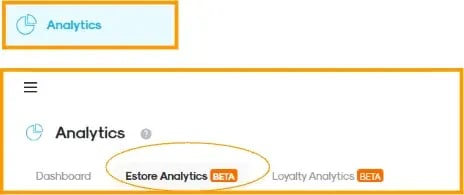
Go to the **“Order Fulfillment”** tab.
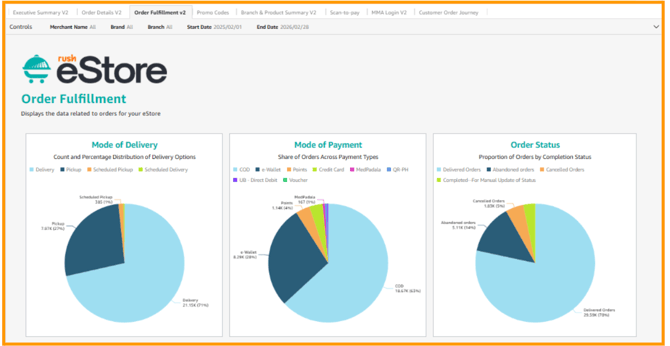
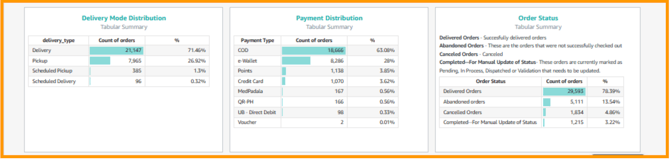
**Order Fulfillment Overview** shows how orders are being delivered, paid, and completed in your eStore, this basically gives a quick view of customer behavior and operational performance, helping you understand how orders move from checkout to completion.
Charts (pie graphs) display the distribution or share (%) of orders for each category, while the tables with bars below show the exact numbers and percentages for easier tracking.
- **Mode of delivery** - This is how the order is fulfilled or received by the customer. For example, Delivery, Pickup, Scheduled Pickup, Scheduled Delivery.
- **Mode of Payment** - How customers pay for their orders. It could be Cash on Delivery or cashless payments.
- **Order Status** - This is the current state or outcome of an order. Delivered, cancelled, abandoned, etc.
- **Delivery Mode Distribution** - the breakdown of orders by delivery type (e.g., delivery, pickup), including the total count and percentage for each.
- **Payment Distribution** - Breakdown of orders by payment method, helping you see which payment options customers use most.
- **Order Status** - Summarizes the number and percentage of orders by their current status.
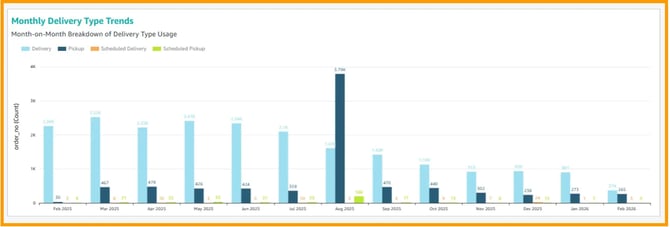
This is the month-on-month usage of each delivery type (Delivery, Pickup, Scheduled Delivery, and Scheduled Pickup).
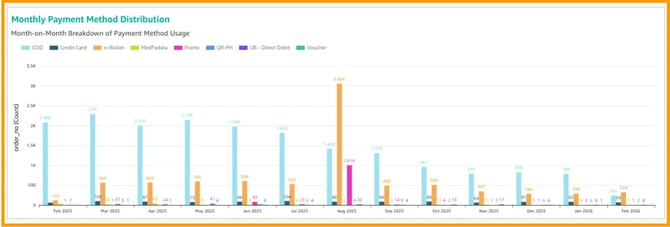
While this is the month-on-month usage of each payment method (e.g., COD, Credit Card, e-Wallet, Voucher). Each bar represents the number of orders per payment method for a specific month, for you to compare how customers choose to pay over time.
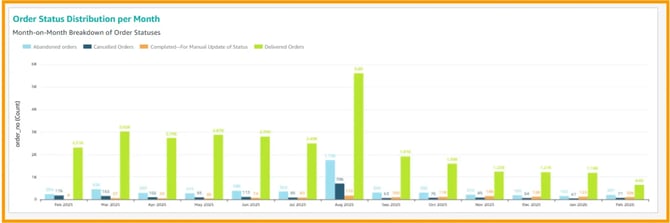
This is the number of orders per status for a specific month, helping you track how orders are completed, delivered, cancelled or abandoned over time.
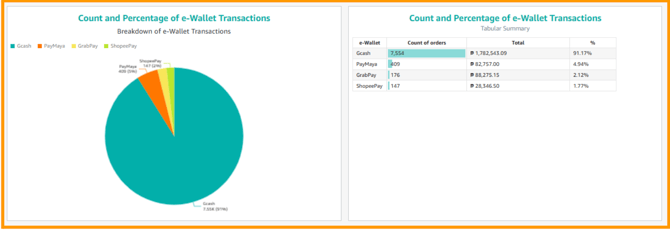
**Count and Percentage of e-Wallet Transactions** shows the **share of e-wallet payments** (e.g., GCash, PayMaya, GrabPay, ShopeePay). This is the percentage and number of transactions per e-wallet type, so you can see which one customers use most.
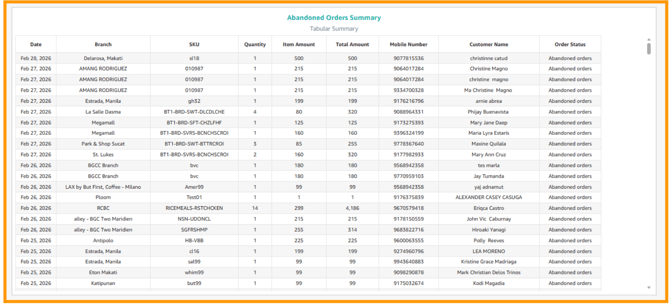
**Abandoned Order Summary** lets you see all orders that weren’t completed during the selected period. It highlights where customers drop off, so you can spot issues in checkout or payment and improve the overall experience.
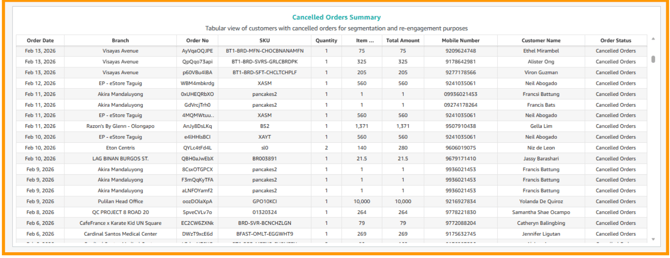
**Cancelled Orders Summary** gives you details on cancelled transactions, including reasons and trends in your eStore to help you identify patterns and improve your order management processes.
- [Getting Started](https://help.rush.ph/knowledge/getting-started#main-content)
- [Before Getting Started](https://help.rush.ph/knowledge/getting-started#before-getting-started)
- [Set up your eStore](https://help.rush.ph/knowledge/getting-started#set-up-your-estore)
- [Set up your Loyalty Program](https://help.rush.ph/knowledge/getting-started#set-up-your-loyalty-program)
- [Set up your Account](https://help.rush.ph/knowledge/getting-started#set-up-your-account)
- [Managing your CMS](https://help.rush.ph/knowledge/managing-your-cms#main-content)
- [eStore](https://help.rush.ph/knowledge/managing-your-cms#estore)
- [Loyalty](https://help.rush.ph/knowledge/managing-your-cms#loyalty)
- [Dine-in experience](https://help.rush.ph/knowledge/managing-your-cms#dine-in-experience)
- [Managing your Merchant Mobile App](https://help.rush.ph/knowledge/managing-your-merchant-mobile-app#main-content)
- [eStore Functions](https://help.rush.ph/knowledge/managing-your-merchant-mobile-app#estore-functions)
- [Loyalty Functions](https://help.rush.ph/knowledge/managing-your-merchant-mobile-app#loyalty-functions)
- [Customer Channels](https://help.rush.ph/knowledge/customer-channels#main-content)
- [eStore Web](https://help.rush.ph/knowledge/customer-channels#estore-web)
- [eStore Mobile App](https://help.rush.ph/knowledge/customer-channels#estore-mobile-app)
- [Punch Card Journey](https://help.rush.ph/knowledge/customer-channels#punch-card-journey)
- [Privilege Card Journey](https://help.rush.ph/knowledge/customer-channels#privilege-card-journey)
- [FAQ's](https://help.rush.ph/knowledge/faqs-1)
- [Service Level Agreement](https://help.rush.ph/knowledge/service-level-agreement)
- [Content Management System](https://help.rush.ph/knowledge/content-management-system#main-content)
- [eStore Functions](https://help.rush.ph/knowledge/content-management-system#estore-functions)
- [Terms and Conditions](https://help.rush.ph/knowledge/terms-and-conditions#main-content)
- [Terms of Agreement Annexes](https://help.rush.ph/knowledge/terms-and-conditions#terms-of-agreement-annexes)
- [News Archives](https://help.rush.ph/knowledge/news-archives#main-content)
- [Merchant Advisories](https://help.rush.ph/knowledge/news-archives#merchant-advisories)
[](https://www.rush.ph/)
Copyright © 2026, RUSH Technologies Inc.