---
title: How to view eStore Merchant Analytics Promo Code?
description: Discover how to view eStore Merchant Analytics for promo codes. Track usage, monitor performance, and gain insights to improve your promotional campaigns and drive better results.
---
[Skip to content](https://help.rush.ph/knowledge/estore-merchant-analytics-promo-code#main-content)
English
Show submenu for translations
[File a Ticket](https://help.rush.ph/knowledge/kb-tickets/new)

Open main navigation
Close main navigation
- English
Show submenu for translations
- [File a Ticket](https://help.rush.ph/knowledge/kb-tickets/new)
- Contact us
Contact us
How can we help you?
- There are no suggestions because the search field is empty.
1. [Knowledge Base | RUSH Help Center](https://help.rush.ph/knowledge)
2. [Managing your CMS](https://help.rush.ph/knowledge/managing-your-cms)
3. [eStore](https://help.rush.ph/knowledge/managing-your-cms#estore)
# How to view eStore Merchant Analytics Promo Code?
## Understand how your promo codes perform with detailed eStore merchant analytics insights.
In CMS, under ‘Analytics’ module
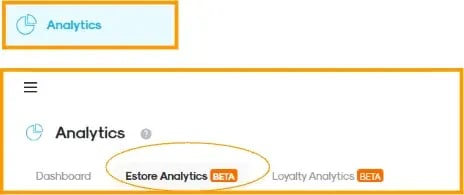
1. Go to the “Promo Codes” tab.
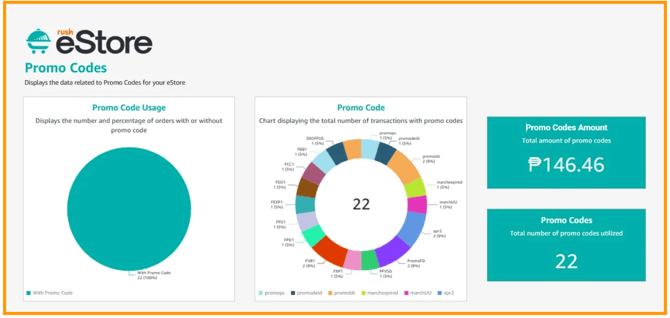
2. Explore the available widgets and charts to monitor promo performance.
- **Promo Code Usage**
Displays the number and percentage of orders that used promo codes versus those that did not, to help identify how reliant customers are on discounts when making purchases.
- **Promo Code Transactions**
Shows the total number of completed transactions where a promo code was applied.
- **Total Promo Code Value**
Represents the total monetary value of discounts given through promo codes. This is important for evaluating the cost of promotional campaigns.
- **Total Promo Codes Used**
Indicates the number of times promo codes were redeemed by customers. A higher count suggests strong engagement with promotional offers.
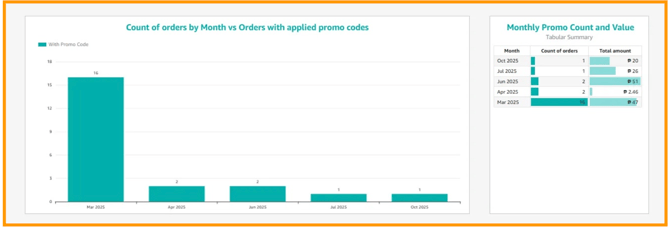
**Orders by Month vs Orders with applied Promo Codes**
This chart compares total monthly orders against those that used promo codes.
- Helps identify seasonal trends in promo usage
- Reveals whether promos drive spikes in sales
- Highlights months where discounts are more effective
**Monthly Promo Count and Value**
The tabular and graphical summary on the right part shows the number of promo codes used per month and the total discount value per month. This allows merchants to evaluate promo performance over time and adjust strategies accordingly.
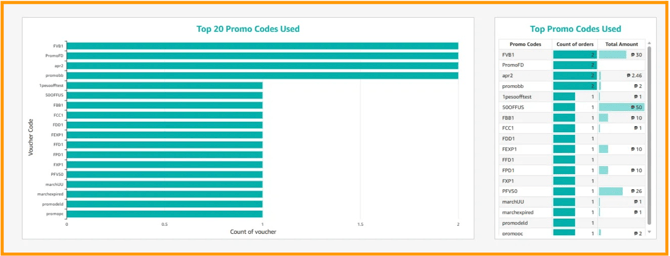
**Top 20 Promo Codes Used**
Displays the most frequently used promo codes ranked by usage count, for merchants to easily identify high-performing campaigns. It helps determine which offers resonate most with customers and provides important insights that can be used to plan and optimize future promotions.
**What Is the Use of eStore Promo Code Analytics?**
eStore Promo Code Analytics helps merchants strike the right balance between attracting customers through discounts and maintaining profitability, ensuring that every promotion contributes to long-term business growth.
- [Getting Started](https://help.rush.ph/knowledge/getting-started#main-content)
- [Before Getting Started](https://help.rush.ph/knowledge/getting-started#before-getting-started)
- [Set up your eStore](https://help.rush.ph/knowledge/getting-started#set-up-your-estore)
- [Set up your Loyalty Program](https://help.rush.ph/knowledge/getting-started#set-up-your-loyalty-program)
- [Set up your Account](https://help.rush.ph/knowledge/getting-started#set-up-your-account)
- [Managing your CMS](https://help.rush.ph/knowledge/managing-your-cms#main-content)
- [eStore](https://help.rush.ph/knowledge/managing-your-cms#estore)
- [Loyalty](https://help.rush.ph/knowledge/managing-your-cms#loyalty)
- [Dine-in experience](https://help.rush.ph/knowledge/managing-your-cms#dine-in-experience)
- [Managing your Merchant Mobile App](https://help.rush.ph/knowledge/managing-your-merchant-mobile-app#main-content)
- [eStore Functions](https://help.rush.ph/knowledge/managing-your-merchant-mobile-app#estore-functions)
- [Loyalty Functions](https://help.rush.ph/knowledge/managing-your-merchant-mobile-app#loyalty-functions)
- [Customer Channels](https://help.rush.ph/knowledge/customer-channels#main-content)
- [eStore Web](https://help.rush.ph/knowledge/customer-channels#estore-web)
- [eStore Mobile App](https://help.rush.ph/knowledge/customer-channels#estore-mobile-app)
- [Punch Card Journey](https://help.rush.ph/knowledge/customer-channels#punch-card-journey)
- [Privilege Card Journey](https://help.rush.ph/knowledge/customer-channels#privilege-card-journey)
- [FAQ's](https://help.rush.ph/knowledge/faqs-1)
- [Service Level Agreement](https://help.rush.ph/knowledge/service-level-agreement)
- [Content Management System](https://help.rush.ph/knowledge/content-management-system#main-content)
- [eStore Functions](https://help.rush.ph/knowledge/content-management-system#estore-functions)
- [Terms and Conditions](https://help.rush.ph/knowledge/terms-and-conditions#main-content)
- [Terms of Agreement Annexes](https://help.rush.ph/knowledge/terms-and-conditions#terms-of-agreement-annexes)
- [News Archives](https://help.rush.ph/knowledge/news-archives#main-content)
- [Merchant Advisories](https://help.rush.ph/knowledge/news-archives#merchant-advisories)
[](https://www.rush.ph/)
Copyright © 2026, RUSH Technologies Inc.