
Quickly monitor your branch and product performance in one place. Access insights on sales distribution, top-performing locations, and best-selling items through your CMS under the ‘Analytics’ module.
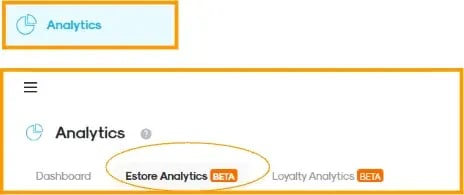
Go to the “Branch & Product Summary” tab.
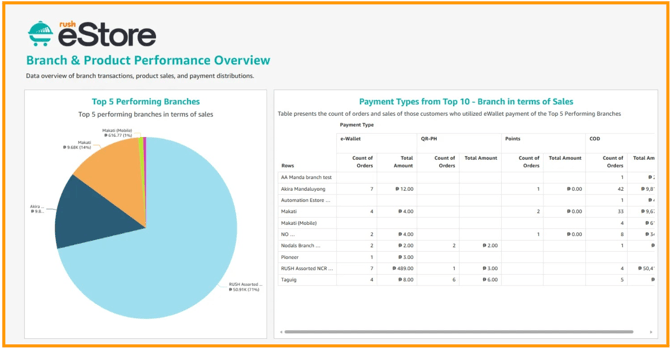
Branch & Product Summary Overview provides a summary of how your branches and products are performing based on sales and transaction data.
- Sales by Branch - Shows the total sales contribution of each branch.
- Transactions by Branch - Displays the number of orders processed per branch.
- Top Products - Highlights the best-selling products based on transactions or sales value.
Top 20 Branches Performance in terms of Sales shows the top 20 branches ranked based on total sales. Each bar represents a branch and its corresponding sales value to quickly identify which locations generate the highest revenue.
Branches at the top indicate strong sales performance, while those lower in the list may require further analysis or improvement.
Branches Summary is the summary of all branches based on total transactions and total sales. Its table on the right side provides a complete overview of branch performance, including:
- Branch Name - The specific store or location.
- Count of Orders - Number of completed orders per branch.
- Total Amount - Total revenue generated per branch.
- Average Basket Size - Average amount spent per order.
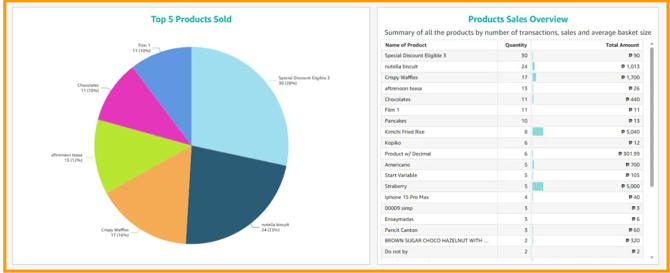
Top Products Sold is the list of top-selling products based on sales or transaction count to help identify which items are most popular and frequently purchased by customers.
Products that consistently appear at the top indicate strong demand and can be prioritized for promotions or restocking.
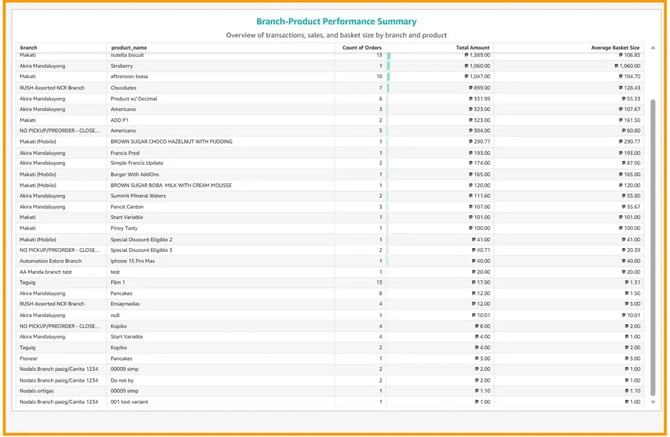
Branch-Product Performance shows overall performance of branches and products by combining key metrics such as transactions, sales, and average basket size in one view to understand how each product performs across different branches.
- Branch Name – Specific store or location.
- Product Name - Name of the item being sold.
- Total Amount - Detailed breakdown of total sales.
- Average Basket Size – The average amount spent per order.