In your CMS, scroll down your module and click Program, select Capping, then open the Notifications tab.
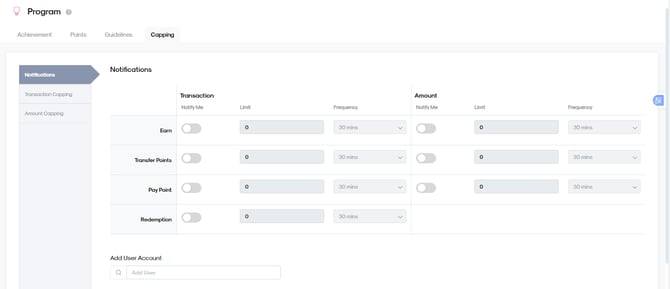
Here, you will also see the other two (2) capping sections:
- Transaction
- Amount
Each section allows you to configure alerts based on your preferred limits.
Understanding the Notification Layout
The table is organized per transaction type:
- Earn
- Transfer Points
- Pay Point
- Redemption
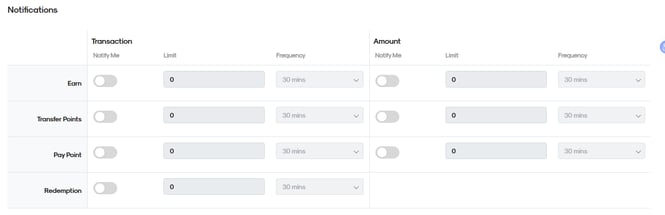
For each of these, you can configure:
Notify Me (toggle switch) - This switch activates the notification.
OFF → No alerts
ON → Alerts will trigger once your threshold is met
Limit - This is the threshold. You define how many transactions
or how much total value before the system alerts you.
Frequency - This is the time window.
Example: 30 mins
(This means the system checks activity within a 30-minute window)
So essentially,
Limit + Frequency = Your Alert Rule
Earn
Refers to points a customer collects. Alerts notify you when points earned exceed your set Limit within a set Frequency.
Example:
Earn 500 points in 1 hour = trigger alert.

The amount section works the same way, it’s just the total amount. Turn on “Notify Me,” set your Limit, and set Frequency. For example, if you set 500 for 30 minutes, you will get notified when it reaches the amount or exceeds 500 within 30 minutes.
Transfer Points
Monitor how many transfer of points can happen.

Example:
- 10 transfers in 1hr = Alert
- 3,000 points can be transferred in 1hr
Pay Point
Set a cap on how many pay-with-points transactions occur and for the amount set a cap on total points spent.

Example:
- 10 transactions in 1hr = Alert
- 3,000 points used in 30 mins
Redemption
To monitor reward redemptions, you can limit the number of redemptions within the time window and the total redemption amount.

Example:
10 redemptions in 30 minutes = trigger alert.
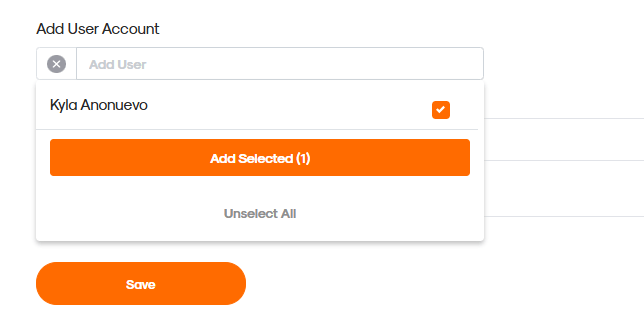
If you want to add a user for who will also get notifications for Capping, click “User Account” and select name(s). Don’t forget to click save.