
As a merchant, you can access your eStore Customer Order Journey analytics in your CMS under the ‘Analytics’ Module. This section helps you understand how customers move from browsing to checkout, and ultimately to order completion or drop-off.
In CMS, under ‘Analytics’ module

What is Customer Order Journey?
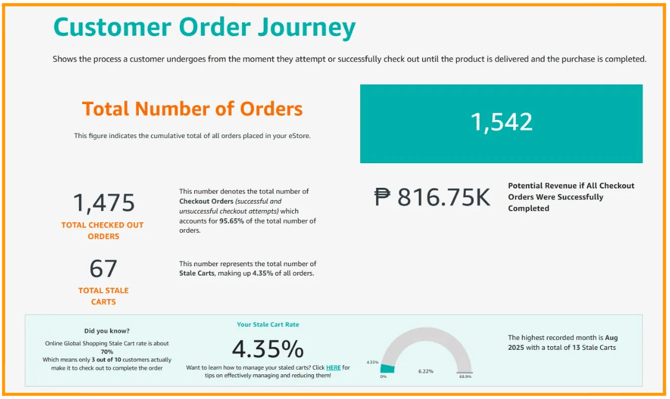
Customer Order Journey shows the full process a customer goes through from attempting to place an order up to delivery completion. It helps you track where customers successfully convert and where they drop off.
- Total Number of Orders - represents the “total number of all orders placed”, including both successful and unsuccessful attempts.
- Total Checkout Orders - number of total checkout orders for both successful and unsuccessful attempts.
- Total Stale Carts - are orders where customers “added items to their cart but did not complete checkout” this reflects missed sales opportunities and possible friction in the buying process.
- Your Stale Cart Rate - percentage of customers who “did not complete their checkout after adding items to their cart” (higher rate may indicate issues such as pricing concerns, checkout complexity, or lack of urgency).
Potential Revenue if All Checkout Orders Were Completed - estimated revenue you could have earned if all initiated checkouts were successfully completed.
-
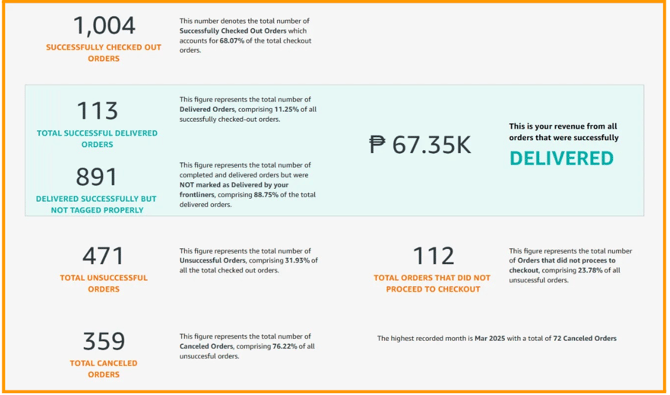
Successfully Checked Out Orders - this number denotes the total number of orders that were successfully checked out.
-
Total Successful Delivered Orders - represents the total number of delivered orders.
-
Delivered Successfully but Not Tagged Properly - orders that were completed and delivered but were not marked as delivered in the system.
-
Total Unsuccessful Orders - total number of orders that were not successfully completed.
-
Total Canceled Orders - this is the total number of orders that were canceled.
-
Total Orders That Did Not Proceed to Checkout - total number of orders that did not reach the checkout stage.
-
Delivered - your total revenue earned from orders that were successfully delivered.