---
title: Engage Customers Through SMS Broadcasting in CMS
description: Learn how to engage customers effectively using SMS broadcasting in the CMS. Step-by-step guide for targeting, scheduling, and tracking your campaigns
---
[Skip to content](https://help.rush.ph/knowledge/engage-customers-through-sms-broadcasting-in-cms#main-content)
English
Show submenu for translations
[File a Ticket](https://help.rush.ph/knowledge/kb-tickets/new)

Open main navigation
Close main navigation
- English
Show submenu for translations
- [File a Ticket](https://help.rush.ph/knowledge/kb-tickets/new)
- Contact us
Contact us
How can we help you?
- There are no suggestions because the search field is empty.
1. [Knowledge Base | RUSH Help Center](https://help.rush.ph/knowledge)
2. [Managing your CMS](https://help.rush.ph/knowledge/managing-your-cms)
3. [eStore](https://help.rush.ph/knowledge/managing-your-cms#estore)
# Engage Customers Through SMS Broadcasting in CMS
## SMS is the most direct way to reach your customers, as messages are delivered straight to their phones—no internet needed.
#### **SMS Broadcasting Guidelines**
- Standard SMS length: **140 characters**.
- Longer messages are split, and **each 140 characters = 1 SMS sendout**.
- **No emojis or special characters** supported.
- Only customers with a **registered mobile number** will receive SMS.
#### **How to Create an SMS Broadcast**
1. Login to your **CMS**
2. Go to the **Engagement Module**
3. Under the **Broadcasting Tab**, click **Create Broadcast**
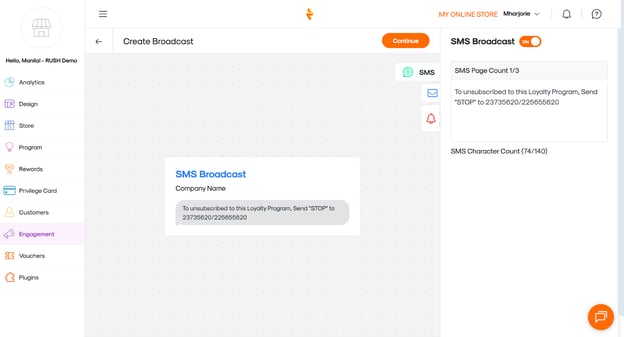
4. Toggle **ON** for SMS Broadcast
5. Edit your SMS content
6. Click **Continue** (upper-left of the preview)
7. Enter a **Broadcast Title**
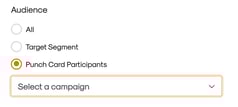
8. Select your **Audience** (All, Target Segment, or Punchcard participants)
- **ALL** – Sends to all customers

- **Target Segment** – Sends to a pre-created segment of customers.

- **Punch Card Participants** – Sends only to customers enrolled in your punch card program.
1. Set the **Publish Date and Time**
#### **Tracking SMS Broadcasts**
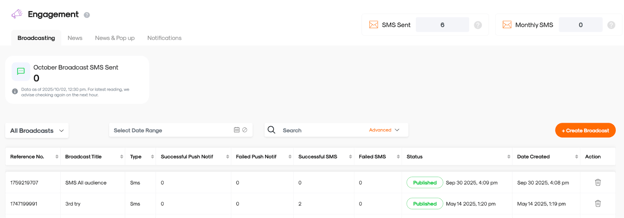
- Check **Broadcasting Logs** on the dashboard
- View if the SMS has been published
- Monitor **successful vs. failed sends** for reporting
**Tip:** Keep messages short, clear, and action-driven to maximize impact within the 140-character limit.
- [Getting Started](https://help.rush.ph/knowledge/getting-started#main-content)
- [Before Getting Started](https://help.rush.ph/knowledge/getting-started#before-getting-started)
- [Set up your eStore](https://help.rush.ph/knowledge/getting-started#set-up-your-estore)
- [Set up your Loyalty Program](https://help.rush.ph/knowledge/getting-started#set-up-your-loyalty-program)
- [Set up your Account](https://help.rush.ph/knowledge/getting-started#set-up-your-account)
- [Managing your CMS](https://help.rush.ph/knowledge/managing-your-cms#main-content)
- [eStore](https://help.rush.ph/knowledge/managing-your-cms#estore)
- [Loyalty](https://help.rush.ph/knowledge/managing-your-cms#loyalty)
- [Dine-in experience](https://help.rush.ph/knowledge/managing-your-cms#dine-in-experience)
- [Managing your Merchant Mobile App](https://help.rush.ph/knowledge/managing-your-merchant-mobile-app#main-content)
- [eStore Functions](https://help.rush.ph/knowledge/managing-your-merchant-mobile-app#estore-functions)
- [Loyalty Functions](https://help.rush.ph/knowledge/managing-your-merchant-mobile-app#loyalty-functions)
- [Customer Channels](https://help.rush.ph/knowledge/customer-channels#main-content)
- [eStore Web](https://help.rush.ph/knowledge/customer-channels#estore-web)
- [eStore Mobile App](https://help.rush.ph/knowledge/customer-channels#estore-mobile-app)
- [Punch Card Journey](https://help.rush.ph/knowledge/customer-channels#punch-card-journey)
- [Privilege Card Journey](https://help.rush.ph/knowledge/customer-channels#privilege-card-journey)
- [FAQ's](https://help.rush.ph/knowledge/faqs-1)
- [Service Level Agreement](https://help.rush.ph/knowledge/service-level-agreement)
- [Content Management System](https://help.rush.ph/knowledge/content-management-system#main-content)
- [eStore Functions](https://help.rush.ph/knowledge/content-management-system#estore-functions)
- [Terms and Conditions](https://help.rush.ph/knowledge/terms-and-conditions#main-content)
- [Terms of Agreement Annexes](https://help.rush.ph/knowledge/terms-and-conditions#terms-of-agreement-annexes)
- [News Archives](https://help.rush.ph/knowledge/news-archives#main-content)
- [Merchant Advisories](https://help.rush.ph/knowledge/news-archives#merchant-advisories)
[](https://www.rush.ph/)
Copyright © 2026, RUSH Technologies Inc.