
Tracking Merchant Mobile App (MMA) logins helps understand how actively branches are using the platform. This tab provides visibility into login behavior, branch activity, and engagement trends to identify which branches are actively managing operations and which may need attention.
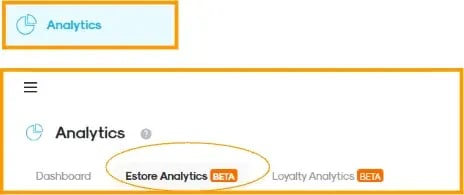
In CMS, under ‘Analytics’ module
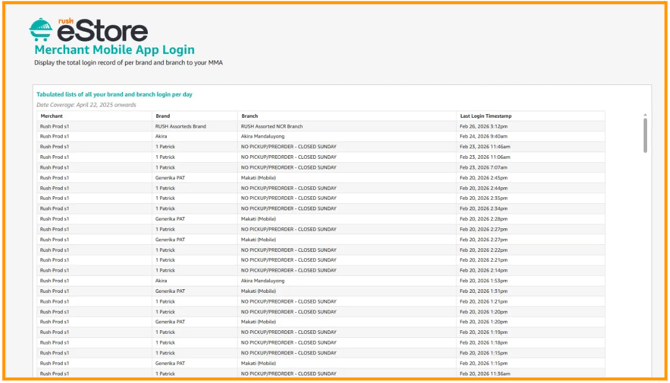
Tabulated List of MMA Logins
Displays a detailed record of login activity per brand and branch, including the exact timestamp of each login to help monitor daily usage and track when branches are accessing the app.
- Merchant - Overall account or business entity.
- Brand - Specific business label under a merchant.
- Branch - Individual store or location under a brand.
- Last Login Timestamp - Shows the most recent login per branch, to quickly determine how recently each branch accessed the MMA.
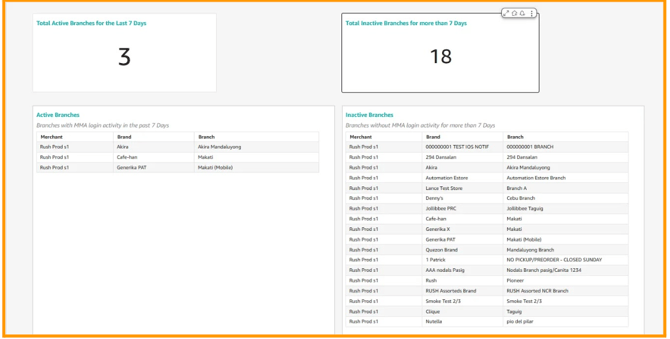
Active Branches - Lists branches with login activity within the last 7 days. This indicates which branches are actively using the platform and staying engaged with operations.
Inactive Branches - Displays branches with no login activity for more than 7 days to identify branches that may require follow-up or support.