---
title: Understanding eStore Analytics
description: Discover how eStore analytics helps you measure performance, improve customer insights, and increase online sales with smarter data-driven strategies.
---
[Skip to content](https://help.rush.ph/knowledge/understanding-estore-analytics#main-content)
English
Show submenu for translations
[File a Ticket](https://help.rush.ph/knowledge/kb-tickets/new)

Open main navigation
Close main navigation
- English
Show submenu for translations
- [File a Ticket](https://help.rush.ph/knowledge/kb-tickets/new)
- Contact us
Contact us
How can we help you?
- There are no suggestions because the search field is empty.
1. [Knowledge Base | RUSH Help Center](https://help.rush.ph/knowledge)
2. [FAQ's](https://help.rush.ph/knowledge/faqs-1)
# Understanding eStore Analytics
## RUSH-powered solutions provide you with a comprehensive analytics dashboard that delivers valuable insights into your online store’s sales performance, customer behavior, and logistics data. In this article, we will discuss the key transaction-related data and reports available in the eStore Analytics module.
### **Basic eStore Data**
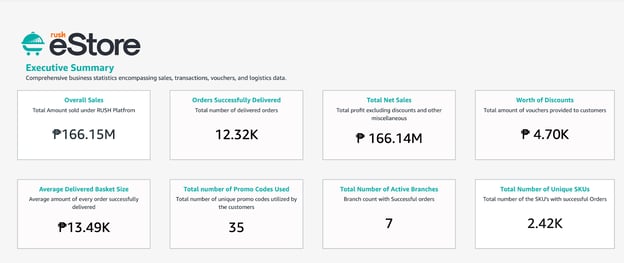
The RUSH-powered eStore module provides merchants with a summary of key business statistics, allowing you to:
- **Overall Sales** – Total amount sold through the RUSH platform.
- **Orders Successfully Delivered** – Total number of completed and delivered orders.
- **Total Net Sales** – Total revenue excluding discounts and other deductions.
- **Worth of Discounts** – Total value of vouchers and discounts applied by customers.
- **Average Delivered Basket Size** – Average order value of all successfully delivered orders.
- **Total Number of Promo Codes Used** – Total count of unique promo codes redeemed by customers.
- **Total Number of Active Branches** – Number of branches with successful transactions.
**Total Number of Unique SKUs** – Total count of unique SKUs sold through successful orders.
### **Executive Summary Tab**
The Executive Summary Tab offers a detailed overview of business performance, including sales, transactions, vouchers, and logistics data.
#### **Key Features:**
- **Total Amount and Transactions by Brand** A visual chart that displays a month-to-month comparison of the total number of delivered orders and their corresponding sales amounts.
- **Average Basket Size by Month** A graphical representation of the monthly average value (basket size) of successfully delivered orders.
- **Voucher Insights**
- Top 5 Promo Codes
- Total Promo Amount
- Promo Code Usage
- **Logistics Data**
- **RUSH Logistics Usage** – A comparison chart of deliveries made via the RUSH platform versus bookings made outside the platform.
- **Maximum Distance (KM)** – The farthest delivery distance covered using RUSH Platform Delivery (via Grab).
- **Average Distance (KM)** – The average delivery distance using RUSH Platform Delivery (via Grab).
- **RUSH Logistics Table** – A detailed breakdown comparing RUSH platform deliveries to other booking methods.
- **Branch Sales Summary (By Brand)** A summarized table showing sales performance across different branches.
### **Order Details Tab**
**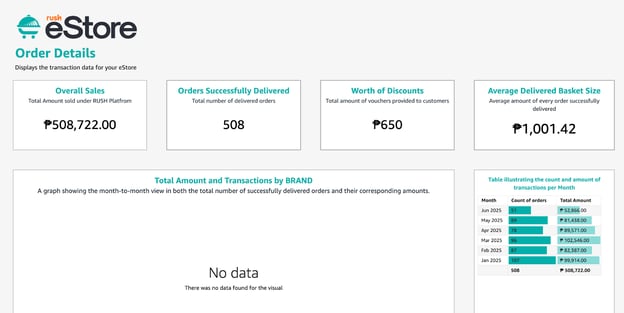**
Shows key transaction data for your eStore:
- **Overall Sales** – Total sales amount under the RUSH Platform.
- **Orders Delivered** – Number of successfully delivered orders.
- **Discounts** – Total value of vouchers given.
- **Average Basket Size** – Average order value of delivered orders.
Includes:
- **Monthly Sales & Transactions by Brand** – Graph and table of delivered orders and sales amount.
- **Monthly Average Basket Size** – Graph and table of average order values.
- **Basket Size by Brand & Branch** – Graph and table of average order values per brand and branch.
### **Order Fulfillment Tab**
**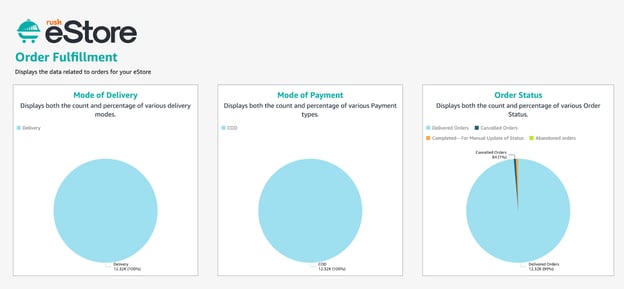**
Provides an overview of your eStore’s order-related data, including delivery modes, payment types, and order statuses.
**Key Highlights:**
- **Mode of Delivery / Payment / Order Status** – Shows the count and percentage for each category, with detailed tables.
- **e-Wallet Payments** – Count and percentage of e-wallet transactions, with a dedicated table.
- **Monthly Trends** – Month-on-month charts for delivery types, payment types, and order statuses.
- **Abandoned Orders** – Table with customer details for re-engagement.
- **Cancelled Orders** – Table with customer details for segmentation and follow-ups.
### **Promo Codes Tab**
**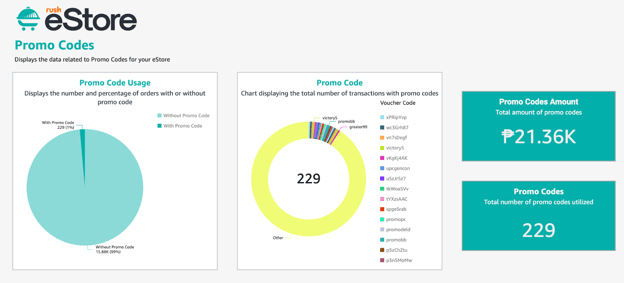**
Shows data on promo code usage for your eStore.
**Key Highlights:**
- **Promo Code Usage** – Number and percentage of orders with or without promo codes.
- **Promo Code Transactions** – Chart showing total transactions with promo codes.
- **Promo Code Amount** – Total value of promo codes used.
- **Monthly Overview** – Orders by month vs. orders with applied promo codes, with a summary table.
- **Top 20 Promo Codes** – Table of the most frequently used promo codes.
### **Branch & Product Summary**
**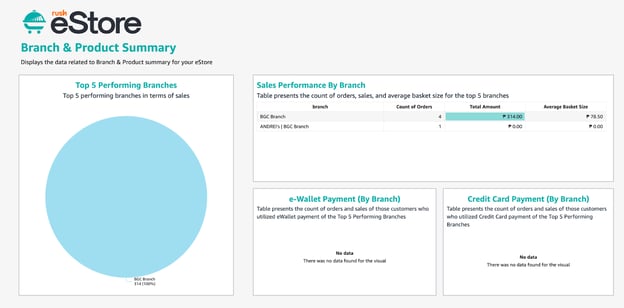**
Provides insights into branch and product performance for your eStore.
**Key Highlights:**
- **Top 5 Performing Branches** – Branches with the highest sales.
- **Sales Performance by Branch** – Orders, sales, and average basket size for the top 5 branches.
- **e-Wallet & Credit Card Payments (by Branch)** – Orders and sales from customers using these payment methods in the top 5 branches.
- **Top 20 Branches** – Ranking by total sales.
- **Branches Summary** – Overview of transactions and sales for all branches.
- **Top 5 Products Sold** – Best-performing products.
- **Product Sales Table** – Transactions, sales, and average basket size per product.
### **Customer Order Journey**
**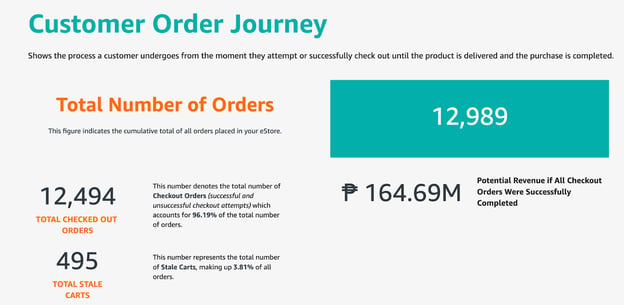**
Illustrates the entire process from when a customer attempts checkout to when an order is delivered or completed.
**Key Highlights:**
- **Total Orders** – Total number of all orders placed in your eStore.
- **Potential Revenue** – Estimated revenue if all checkout orders were completed.
- **Stale Cart Rate** – Percentage of orders left in carts without checkout.
- **Successfully Checked Out Orders** – Total number of completed checkouts.
- **Successful Deliveries** – Total delivered orders.
- **Delivered but Not Tagged Properly** – Orders delivered but not marked correctly.
- **Unsuccessful Orders** – Orders that failed to complete.
- **Cancelled Orders** – Orders canceled by the customer.
- **Orders Not Proceeding to Checkout** – Total orders that did not move past the cart stage.
These dashboard tabs give you a clear, organized view of your eStore’s performance — from sales, promo codes, and branch performance to customer behavior and order fulfillment.
By understanding these insights, you can make data-driven decisions, improve customer experience, and optimize your overall business operations.
- [Getting Started](https://help.rush.ph/knowledge/getting-started#main-content)
- [Before Getting Started](https://help.rush.ph/knowledge/getting-started#before-getting-started)
- [Set up your eStore](https://help.rush.ph/knowledge/getting-started#set-up-your-estore)
- [Set up your Loyalty Program](https://help.rush.ph/knowledge/getting-started#set-up-your-loyalty-program)
- [Set up your Account](https://help.rush.ph/knowledge/getting-started#set-up-your-account)
- [Managing your CMS](https://help.rush.ph/knowledge/managing-your-cms#main-content)
- [eStore](https://help.rush.ph/knowledge/managing-your-cms#estore)
- [Loyalty](https://help.rush.ph/knowledge/managing-your-cms#loyalty)
- [Dine-in experience](https://help.rush.ph/knowledge/managing-your-cms#dine-in-experience)
- [Managing your Merchant Mobile App](https://help.rush.ph/knowledge/managing-your-merchant-mobile-app#main-content)
- [eStore Functions](https://help.rush.ph/knowledge/managing-your-merchant-mobile-app#estore-functions)
- [Loyalty Functions](https://help.rush.ph/knowledge/managing-your-merchant-mobile-app#loyalty-functions)
- [Customer Channels](https://help.rush.ph/knowledge/customer-channels#main-content)
- [eStore Web](https://help.rush.ph/knowledge/customer-channels#estore-web)
- [eStore Mobile App](https://help.rush.ph/knowledge/customer-channels#estore-mobile-app)
- [Punch Card Journey](https://help.rush.ph/knowledge/customer-channels#punch-card-journey)
- [Privilege Card Journey](https://help.rush.ph/knowledge/customer-channels#privilege-card-journey)
- [FAQ's](https://help.rush.ph/knowledge/faqs-1)
- [Service Level Agreement](https://help.rush.ph/knowledge/service-level-agreement)
- [Content Management System](https://help.rush.ph/knowledge/content-management-system#main-content)
- [eStore Functions](https://help.rush.ph/knowledge/content-management-system#estore-functions)
- [Terms and Conditions](https://help.rush.ph/knowledge/terms-and-conditions#main-content)
- [Terms of Agreement Annexes](https://help.rush.ph/knowledge/terms-and-conditions#terms-of-agreement-annexes)
- [News Archives](https://help.rush.ph/knowledge/news-archives#main-content)
- [Merchant Advisories](https://help.rush.ph/knowledge/news-archives#merchant-advisories)
[](https://www.rush.ph/)
Copyright © 2026, RUSH Technologies Inc.